OfficialPremium finance v1.0.0
Budget Tracker
Income and expense tracking with categories, recurring transactions, and reports.
Early access 📅 Updated 2026-03-20
What it does
A comprehensive income and expense tracking system with categories, recurring transactions, and financial reports — all managed through your AI agent. Log expenses as they happen by telling your AI, set up recurring bills, and get monthly summaries without opening a spreadsheet.
Ask your AI for a breakdown of spending by category, compare this month to last, or find out exactly how much you've spent on subscriptions. The budget tracker supports multiple accounts, custom categories, and automated recurring transaction entries so you never forget a regular bill.
All financial data is stored as encrypted JSON files on your local machine. No Mint, no YNAB, no bank API connections sharing your data with third parties. Your financial information stays on your hardware — the most private budget tracker you'll ever use.
Key features
Category Breakdown
Organize transactions into custom categories and get visual breakdowns of where your money goes each month.
01Recurring Transactions
Set up recurring income and expenses that auto-populate. Track subscriptions, rent, salary, and regular bills.
02Financial Reports
Generate monthly, quarterly, or annual reports with income vs expenses, category trends, and savings rate.
03Multi-Account Support
Track multiple accounts — checking, savings, credit cards — and see your complete financial picture in one place.
04See it in action
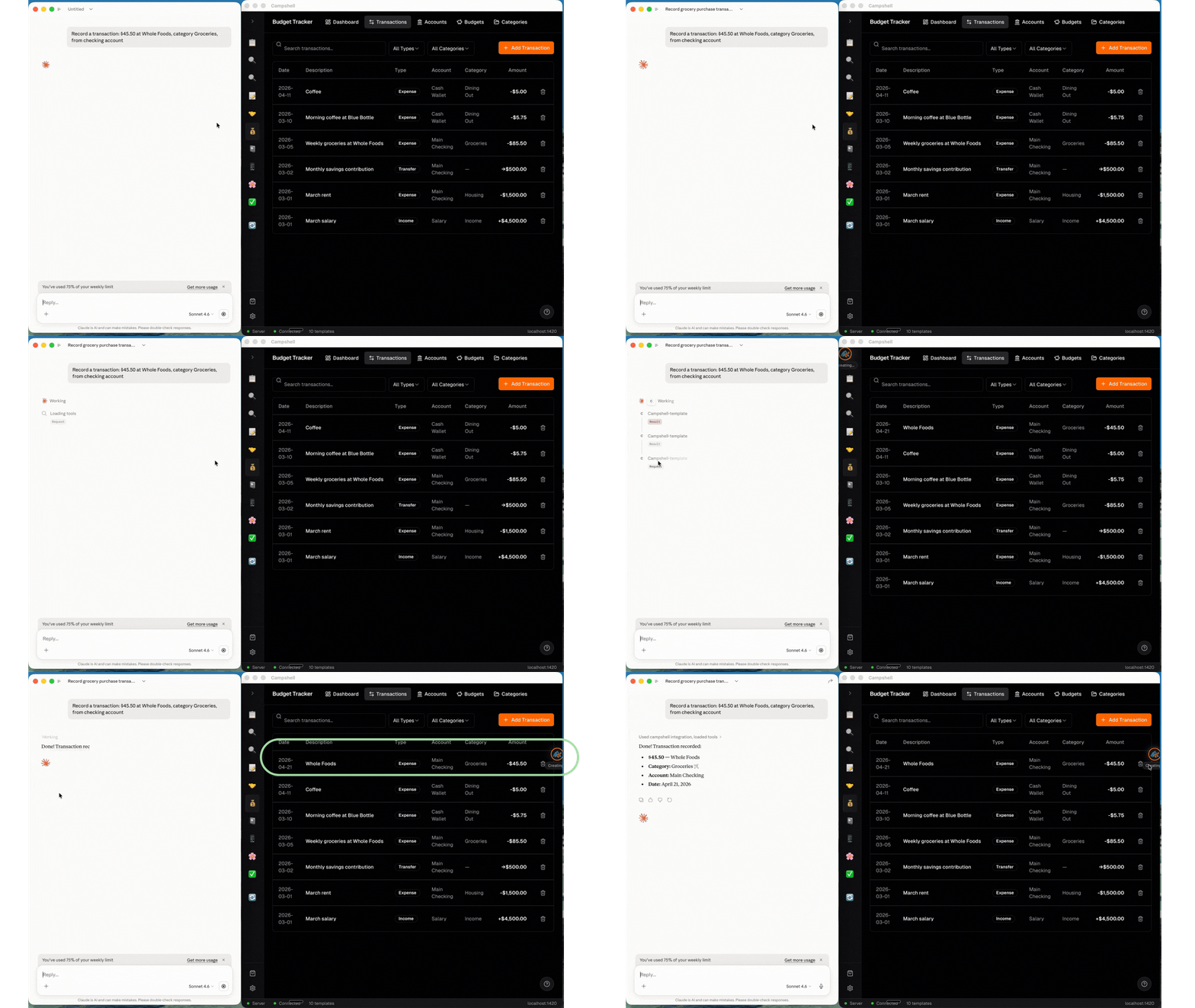
Here's what Budget Tracker looks like in the Campshell app.
Try talking to your AI
Just say what you need. Your agent reads and writes Budget Tracker data for you.
🦞
Claw
AI Agent · Budget Tracker
Log an expense: $45 at Whole Foods, category groceries
🦞 Claw · Budget Tracker
Done! I've updated your Budget Tracker. Try asking:
Under the hood
Your data lives as plain JSON files on your machine. No cloud, no lock-in.
File structure
.campshell/budget-tracker/
├── manifest.json
├── skill.md
├── transactions/
│   └── 2026/
│       └── 03/
│           ├── txn-001.json
│           └── txn-002.json
├── accounts/
│   ├── checking.json
│   └── savings.json
├── recurring/
│   └── rec-001.json
└── schema/
    └── transaction.schema.json
Example data
{
  "id": "txn-001",
  "type": "expense",
  "amount": 45.00,
  "currency": "USD",
  "category": "groceries",
  "description": "Whole Foods weekly groceries",
  "account": "checking",
  "date": "2026-03-20",
  "recurring": false,
  ...